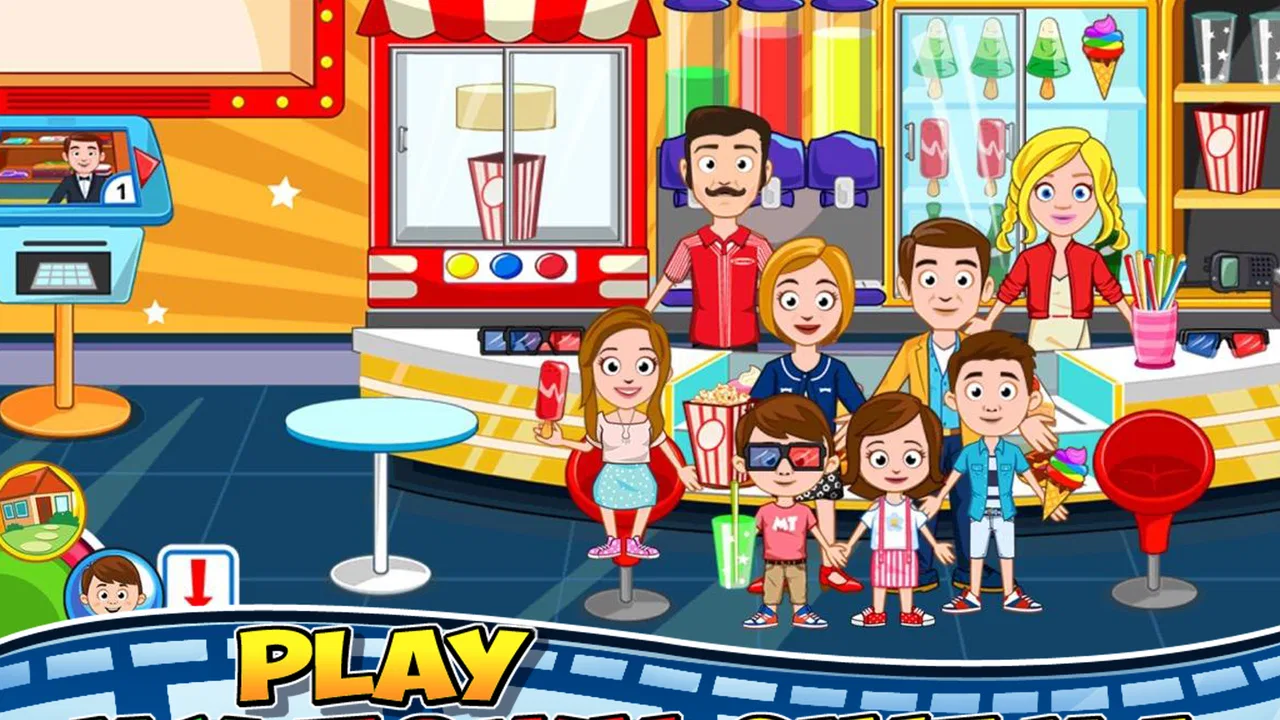
My Town : Cinema
- 4.3
- Rating
- 10.00K
- Installs
- $4.49
- Price

 Analysis by App-foxy
My Town : Cinema is the kind of educational game that makes a strong first impression because it turns a familiar place into a small stage for pretend play. I found myself less interested in “winning” than in arranging a movie day, choosing who would act, and deciding what kind of story the cinema should produce. That open-ended approach feels welcoming for children who enjoy role-play, while still giving adults a clear way to see what the game is trying to offer.
Developed by My Town Games Ltd, the game is built around a cinema setting rather than a traditional level system. Its central idea is simple: watch different movies, take on acting roles, or direct the action yourself. The result is closer to a digital playset than a lesson-based educational tool. That distinction matters. Children who learn through imagination may return to it naturally, but anyone expecting quizzes, formal progress tracking, or a structured curriculum will probably find the experience too loose.
The game is available for Everyone and costs $4.49. It has an average rating of 4.3 from over 300 ratings, with more than 50 written reviews, and has passed 10 thousand installs. Those figures suggest a modest but established audience rather than a massive mainstream hit. It first appeared on November 16, 2016, and the current version is 7.03.06, supporting Android 8.0 and later.
You May Also Like

 Pandora - Music & Podcasts
Pandora’s Music Is Easy to Start, but Harder to Recover
Pandora’s strength is its low-effort path from a seed to a station. Its weak spot is how much confidence it asks you to place in connection, setup, and quiet recovery.

 8 Ball Pool
 Is Built on Rivalries, Rematches, and Routine
A close look at the rivalries, rematches, shared routines, and unanswered safety questions that turn a quick pool match into a persistent mobile community.

 Samsung Music
’s Quiet Strength Is Playing What You Already Own
Its reach comes less from spectacle than from dependable access to a personal library. That simplicity is both the app’s strongest retention engine and its ceiling.

 AccuWeather: Weather Radar
AccuWeather Review: A Quick, Clear Forecast for Everyday Decisions
For everyday plans, the best forecast is the one you can understand quickly. AccuWeather makes rain timing, radar, and local conditions easy to act on, with a few trade-offs.

 Hill Climb Racing
Why Hill Climb Racing Still Turns Crashes Into One More Run
A tiny car, a bumpy hill and one more upgrade: Hill Climb Racing keeps resurfacing because its simple chaos makes every near-miss feel personal.

 AliExpress - Shopping App
AliExpress Makes Global Shopping Feel Personal, but Shoppers Bear the Risk
AliExpress turns a global marketplace into a pocket-sized discovery engine. Its reach is useful, its shopping loop compelling, and its trade-offs easy to miss.
More From Our News Desk
View All News


What the first week feels like
During the first sessions, the appeal comes from discovering how many small choices can be turned into a scene. A child can imagine being the actor, directing other characters, or simply observing the cinema as a place where things happen. Because the setting is recognizable, the game does not need a complicated explanation. A parent can hand it over and say, “Make a movie,” and the child immediately has a starting point.
I especially liked that the game does not force one correct interpretation of the cinema. One session can become a serious film shoot, another can be a silly performance, and another can involve moving characters around just to see what kind of story appears. This flexibility is more valuable than it may sound. It gives children room to practice sequencing, dialogue, cooperation, and decision-making without presenting those skills as exercises.
The first-week experience is strongest when the child already enjoys pretend play. Moving between acting and directing creates a useful change of perspective. When playing the actor, the child can focus on a character’s role. When playing the director, the child has to think about the whole scene and decide what everyone else should do. That shift can encourage planning and storytelling in a way that a fixed mini-game usually cannot.
It also works well as a shared activity. A parent can suggest a theme, such as making a short comedy or recreating a dramatic scene, while the child controls the characters. Siblings can divide responsibilities, with one choosing the cast and another arranging the action. The game does not need to become a formal family project; even a few minutes of cooperative play can make the cinema feel more alive than it would in solitary use.
One practical tip is to avoid introducing every possibility at once. I would begin with one simple story: someone arrives, something happens, and the characters leave. After that, add a director, a second scene, or a change in tone. This keeps the play understandable and helps a child discover the setting through a sequence rather than treating it as a collection of objects.
The game’s educational value is therefore indirect. It supports creative expression, but it does not replace reading practice, arithmetic games, or a guided learning app. I would describe it as an imaginative learning environment. The child is learning how to construct and communicate a scenario, not memorizing a defined body of knowledge.
Why the cinema setting works
A cinema is a particularly useful setting for this style of play because it naturally combines audience, performers, and production. That gives the child several roles to explore without requiring separate game modes. The same scene can be viewed from the perspective of the person acting, the person organizing the action, or the person watching the result.
That built-in role switching is one of the less obvious strengths. Many pretend-play apps let children move characters around, but this one gives the movement a reason: the characters are part of a movie. If a child gets bored with acting, directing provides a new angle. If directing feels too demanding, simply watching or rearranging the scene offers a gentler way back into play.
There is also a useful social lesson in the difference between having an idea and making the idea understandable to others. A child may know what should happen in a scene, but a sibling or parent may not. Explaining the plan, assigning roles, and adjusting when the scene does not work can build communication skills. These benefits depend on how the game is used, so adult involvement makes a noticeable difference.
Still, the setting can feel narrower than a broad town-style game. A cinema gives the experience a clear identity, but it also places limits on the stories that feel natural. Children who prefer exploration across many locations may lose interest sooner than children who enjoy repeating and changing familiar pretend scenarios.
Will it still matter after the novelty fades?
The most important question for a paid children’s game is not whether it entertains during the first afternoon. It is whether the child can return to it after the initial discovery period. In my experience, the recurring value here comes from creating new situations rather than unlocking new content. The game is most durable for children who are happy to invent variations on a theme.
That means the parent’s role can influence its lifespan. If the child is always asked to repeat the same kind of movie, the cinema may feel exhausted quickly. If the family introduces different prompts, the same setting becomes more flexible. Try asking for a movie with no talking, a story where the director changes the ending, or a scene in which every character has a different goal. These prompts create variety without requiring extra game systems.
A useful monthly routine would be to return to one unfinished story and change only one element. Keep the characters but alter the setting within the cinema’s available play space. Keep the basic plot but swap who directs. Or let a child explain why a scene failed and produce a revised version. This turns the game into a small storytelling workshop instead of a toy that is used once and forgotten.
The paid model helps the long-term decision in one straightforward way: the purchase is made upfront at $4.49 rather than treating the game as a free download that must constantly compete for attention. For a family already interested in My Town Games Ltd titles, that can make the app easier to justify. For a child who only enjoys highly structured challenges, the same price may feel less worthwhile because the game’s replay value depends heavily on imagination.
I would not choose this as the only digital activity for a child. Its strengths are creative and social, not comprehensive. A family looking for clear goals, measurable progress, or short challenges with obvious completion points would probably get more lasting use from a conventional educational game. This one earns repeat visits when the child wants to make something, not when the child wants to finish something.
Keeping the play fresh without forcing it
The best way to extend its life is to treat each session as a production with a small objective. One day, the goal might be to tell a story with a beginning, middle, and end. Another day, the child can focus on directing everyone from one scene to the next. A third session can be about making the audience understand what happened without an adult explaining it.
These challenges are simple, but they expose different skills. Story structure encourages sequencing. Directing encourages organization. Silent scenes encourage visual communication. Asking the child to describe the movie afterward adds language practice without turning the game into homework.
I also recommend allowing imperfect scenes to remain imperfect. The charm of this type of game is that unexpected movement or an odd character choice can become part of the story. If an adult corrects every detail, the child may start following instructions instead of experimenting. The game’s long-term value is greatest when the child owns the decisions.
For younger players, a parent may need to help with the first story and explain the difference between acting and directing. After that, stepping back is usually better. The game should not become a performance demanded by adults. It works best when the child can make something private, funny, or completely nonsensical.
Where the maintenance burden appears
The game is easy to maintain in the sense that it does not require a complicated routine from the player. There is no need to manage a large collection of resources or remember a demanding progression path. A child can return after a break and start playing again without studying instructions. That low re-entry cost is a real advantage for families who want an occasional creative activity.
The maintenance burden is instead placed on variety and supervision. Because the experience is open-ended, adults may need to provide occasional ideas if the child begins repeating the same scene. That is not a flaw in the controls, but it does affect whether the game remains useful. A child who needs new objectives supplied by the app may eventually ask, “What do I do now?”
Device compatibility is another practical point. The game requires Android 8.0 or later, so it is worth checking an older family tablet before buying. On a supported device, the current version is 7.03.06. I would also set up the game before offering it to a young child, not because the play itself is difficult, but because a smooth first session makes it easier to understand the controls and avoid interruptions.
Since this is a paid game, I would make the purchase decision based on the child’s play style rather than the number of available sessions. A child who repeatedly creates stories with dolls, figures, or cardboard props is a strong candidate. A child who quickly abandons open-ended toys in favor of games with levels may not use it enough to justify the cost.
Another maintenance issue is shared-device etiquette. If several children use the same tablet, they may want different stories at the same time. The game is more enjoyable when each child gets room to direct rather than having one child control every decision. Establishing short turns can help, but families should know that the app itself is not a substitute for agreeing how to share.
Small habits that improve each session
I found three habits especially helpful. First, start with a spoken plan before moving characters. A child can say who the main character is and what problem needs solving. Second, let the child direct one complete scene before changing roles. Constant switching can make the play feel scattered. Third, finish by asking what the audience was meant to understand. That final question turns free play into reflection.
Another useful approach is to use the cinema for collaborative storytelling rather than solo control. One person can invent the opening, another can decide the middle, and a parent can ask how the ending should resolve. This makes the app more valuable for language development and cooperation, especially when the children are willing to listen to one another.
These methods are not hidden buttons or special modes; they are ways of getting more from the game’s design. That is important because the app’s lasting usefulness does not come from a deep progression system. It comes from how well the family turns its central cinema idea into repeatable creative activities.
What may cause fatigue over time
The biggest source of fatigue is the absence of pressure to continue. At first, that freedom feels liberating. Later, some children may interpret it as a lack of things to do. If the child wants missions, rewards, or increasingly difficult challenges, the open playset format may seem flat after the first-week excitement.
Repetition can also become visible when the same characters and scenes are used in identical ways. The problem is not that the cinema cannot support new stories; it is that the app does not automatically generate those stories for the player. Parents should be realistic about that trade-off. The game offers a stage, but the child has to bring the script.
There is a difference between creative repetition and empty repetition. Replaying a favorite movie while changing the ending can be meaningful. Repeating the same movements because the child has run out of ideas is a sign that a break may be better than another prompt. I would not push the app as a daily obligation. Its value is stronger when it is available for occasional imaginative play.
The educational label may also create unrealistic expectations. This is not the right choice if a parent wants lessons that build in a clearly ordered way. Compared with a phonics app, a math game, or a puzzle app with explicit feedback, the learning here is less measurable. Compared with a generic digital dollhouse, however, the cinema theme gives pretend play a clearer structure and encourages children to think about roles and storytelling.
There is also a maturity consideration despite the Everyone rating. The content is broadly approachable, but suitability is not only about age classification. Some children will need help understanding how to create a scene, while others may find the freedom immediately engaging. I would judge readiness by whether the child can invent a simple pretend situation and tolerate making choices without being told what happens next.
For children who prefer watching rather than creating, the movie idea may sound appealing but still fail to hold attention. The game is not best understood as a passive video experience. Its value lies in becoming part of the production. If a child wants a library of finished entertainment, a streaming service or a video app is a better fit. If the child wants to control characters and shape a story, this game makes more sense.
My long-term verdict
After the novelty fades, My Town : Cinema remains worthwhile for a specific kind of player: a child who enjoys role-play, invents dialogue, and likes changing the outcome of familiar situations. It is not a game I would recommend because it promises constant new rewards. I would recommend it because the cinema setting gives imaginative play a useful frame, and because acting and directing create two different ways to engage with the same story.
The strongest long-term use is as an occasional creative tool shared with a parent, sibling, or friend. A five-minute prompt can become a short story, and a longer session can develop into a small production with roles and revisions. That flexibility gives it more staying power than a one-joke novelty app, but only if the child is genuinely interested in creating scenes.
I would skip it for a child who needs clear objectives, frequent feedback, or academic instruction. I would also think twice if the family already owns several open-ended role-play games that the child rarely revisits. In that situation, the cinema theme may not add enough variety to earn regular space on the device.
For the right household, though, the upfront price is reasonable for a focused pretend-play experience, especially when the child can use it independently after learning the basic idea. The rating of 4.3 reflects a generally positive reception, but the more useful question is whether your child enjoys directing their own play. That is the dividing line between a game that gathers digital dust and one that keeps returning to the tablet.
My final view is positive but specific. This educational game does not teach through lessons; it teaches through making, explaining, and revising imaginary movies. Its first-week appeal is immediate, its monthly value depends on fresh prompts, and its main maintenance cost is the need for occasional human imagination. If that sounds like a good match for your child, the cinema can become a surprisingly durable creative space. If not, a more structured alternative will probably deliver better everyday value.
FAQs for My Town : Cinema
01What is My Town: Cinema, and what can children do in the game?
My Town: Cinema is a digital pretend-play game where children can explore and role-play in a movie theater environment. Players can choose characters, dress them up, visit different areas of the cinema, select snacks, watch movies, and create their own stories. There are no fixed missions requiring a specific solution, so children can freely experiment and use their imagination while interacting with the available objects and locations.
02Is My Town: Cinema suitable for young children?
The game is generally designed for children who enjoy creative, open-ended play, especially preschool and early elementary-age users. Its simple touch controls and colorful presentation make the locations easy to explore without advanced gaming skills. However, parents should still review the age rating, available content, and store information for their region, since suitability can vary depending on a child’s age, reading ability, and the device’s enabled features.
03Does My Town: Cinema require an internet connection to play?
My Town: Cinema is primarily a single-player experience and many of its core activities can usually be enjoyed without a continuous internet connection after the game has been installed. An internet connection may still be needed for the initial download, updates, advertisements, restoring purchases, or accessing certain platform services. Offline behavior can differ by device and version, so testing the app after installation is recommended.
04Are there in-app purchases or advertisements in My Town: Cinema?
Depending on the version and platform, My Town: Cinema may include advertisements, optional purchases, or links to other content within the My Town series. The exact arrangement can change after updates or differ between Android and iOS. Parents should check the official store listing before downloading and use device-level parental controls or purchase restrictions if children will play independently.
05Can children play My Town: Cinema with friends or other players?
My Town: Cinema is focused on local, individual creative play rather than online multiplayer competition. Children can control several characters on the same device and act out stories involving moviegoers, staff, friends, or family members, which can make cooperative play possible when sharing the screen. It does not primarily function as an online social game, so users should not expect matchmaking, chat rooms, or competitive modes.
Pros
- Easy controls make it accessible for younger children.
- Bright visuals and playful animations keep scenes engaging.
- Characters and props can be freely moved around the cinema.
- Works well for imaginative
- open-ended storytelling.
- Suitable for short
- casual play sessions without complex rules.
Cons
- Some content and features may require in-app purchases.
- Limited challenge may feel repetitive for older children.
- Large downloads can use noticeable storage space.
- Performance may vary on older or less powerful devices.
- Gameplay offers little structure for players seeking clear objectives.

My Town : Cinema
Gallery